Crypto 101 for (Non-Crypto Bro) Canadians
Learn the basics of how cryptocurrency works, what dangers to look out for, and how you can make more anonymous transactions online.

Updated • read

Table of Contents
I am not a financial advisor. This article should not be seen as investment advice.
Do you need a quick education of how cryptocurrency works? Need to purchase something with it? Want to avoid all the financial grifters? You’ve come to the right place.
What is Crypto?
Section titled What%20is%20Crypto%3FCrypto, or cryptocurrency, is digital currency designed to be decentralized, without a centralized authority, such as the Bank of Canada.
Computers (referred to as nodes), run software to negotiate and store the same database, to track transactions and balances. This database is called a blockchain.
Can someone give themselves infinite crypto?
Section titled Can%20someone%20give%20themselves%20infinite%20crypto%3FWith the exceptions of:
- The beginning of a blockchain, where there are little to no validators, or,
- The blockchain is a test network, making being able to give themselves arbitrary amounts of (monetarily-worthless) crypto make sense,
…the answer is no.
Crypto is transferred and generated through a set of programmed rules.
Since a bunch of machines running the same node software are keeping track of the currency, they will all need to have consensus. This is needed so one rogue machine can’t add, remove, or transfer any amount of crypto from anyone to anyone.
One common consensus method is “proof of work”, where computers try to solve a cryptographic puzzle. If a computer solves a puzzle, they’re able to create a new block. “Mining” this block gives the “miner” a newly-minted reward of crypto along with transactions fee earnings.
Another common method is “proof of stake”, where validators stake a cryptocurrency, and are selected at random to create a block and earn a reward. This system is more complicated, but the idea is that the more cryptocurrency you have, the more likely you’ll be selected to create a block.
As long as there is enough consensus that money shouldn’t printed for a user, someone likely can’t give themselves infinite.
Things to Know About Crypto
Section titled Things%20to%20Know%20About%20CryptoHere’s a quick rundown of what to know:
Investing in crypto is (probably) a bad idea.
Crypto is a highly speculative asset. Prices will fluctuate wildly, so investing (buying or staking crypto) should be considered—just like buying individual stocks—gambling. The line does not always go up. Don’t let the fear of missing out (FOMO) rob your life savings.
If you plan to grow your money, I recommend an ETF with a diverse portfolio instead. And if you’re doing it anyway, watch Louis Rossmann’s video about investing first.
You can’t reverse a crypto transaction.
With traditional financial systems, you may be able to talk to a central authority to reverse your transaction in case you get scammed. Due to the nature of decentralization, there is basically no central authority you can ask to have a transaction reversed.
This can rear its ugly head, if you send crypto to the wrong address, or if you’ve gotten hacked. Be warned!
Non-Fungible Tokens (NFTs) are a grift.
It has been a couple years since they’ve entered (and now exited) the mainstream, and there hasn’t been any valid use case, except to speculatively invest in, and hope you’re not the one “holding the bag” in the end.
And seriously; the first point bears repeating.
If you feel you’re completely unemployable, looking to get financial independence, and all you need is some luck and knowledge on crypto, this won’t work.
I’ve personally lost 50% of my investment in a bull trap, and I consider that lucky. If I “won”, I would easily have the potential to lose more because I thought I knew what I was doing.
Alternatives are tough to come by though, especially without the security of a Universal Basic Income (UBI). If your net worth is less than $4,000, you may wish to look at Employment and Income Assistance (EIA) or similar outside of Manitoba. This system is complicated, and I recommend you first find social services to help you through this.
Buying Things
Section titled Buying%20ThingsIf you need crypto to pay for legal goods and services, you can use a Canadian brokerage or exchange to purchase it.
Why only legal?
Section titled Why%20only%20legal%3FWith few exceptions (ex. Monero), purchases you do with crypto can be tracked back to you, by anyone.
Most (if not all) coins on exchanges involving fiat currency, have transparent blockchains. Using a blockchain explorer, you can see what addresses sent crypto to other addresses. These addresses from you (via the exchange) can be traced backed to you.
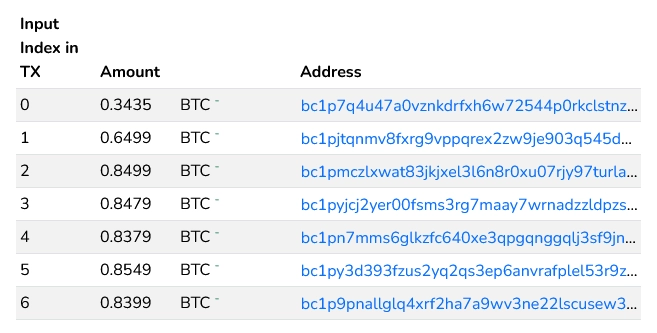
Know Your Client (commonly abbreviated to KYC) is a legal requirement for Canadian exchanges to collect and store your identity. When signing up to an exchange, you’ll need to give them your ID (ex. driver’s license) as proof as you are who you say you are.
If you don’t want your transactions traced back to you, you’ll need to either:
Crypto mining (recommended, best)
Assuming your electricity bill can’t be correlated to you mining, this is a way to obtain clean cryptocurrency without any connection to you. See the section Mining Crypto for more details.
Use a mixer service (not recommended)
Mixers used to be used for financial privacy, but also for money laundering. You should keep yourself up-to-date on the laws regarding mixers, as operators have been criminally charged or given civil penalties. Whole services such as Tornado Cash have been sanctioned in the United States, making it illegal to use for US citizens.
You’ll also need to trust the mixer service to not steal your coins, and for the mixer service to have high-enough liquidity to mix the coins.
An alternative to mixer services (with the same privacy and custodial risks), is using a Bitcoin service that doesn’t require personal information. Examples of these services are Bitcoin casinos, Bitcoin poker websites, tipping websites, altcoin exchanges or online marketplaces.
For a significantly more in-depth article on Bitcoin privacy, check out Privacy - The Bitcoin Wiki. It includes how to send and receive anonymously, good and bad examples of privacy, and side channels that can attack your privacy.
For online gray-area services, or to remain more anonymous for certain transactions, crypto may be your best bet. Basically all payment processors like Mastercard sell your financial data. For in-person, cash can be used to avoid surveillance.
Brokerages
Section titled BrokeragesA brokerage lets you exchange your fiat currency (Canadian dollars) into cryptocurrency, and vice-versa.
Some popular Canadian exchanges include:
Newton (Recommended)
Newton is a popular Canadian brokerage. Their fees range from 1% to 1.5%, depending on the coin according to their website. It’s also free to add funds via e-Transfer or wire.
You can view Newton fees here for more info.
Wealthsimple is well-known in the investment space, with generally good fees for many of their services. You can fund your account with fiat for free via EFT and e-Transfer. Their default crypto trading fee is 2%, which is considered high.
Using Wealthsimple may be preferable if you already use it, and want the convenience and security of not having to give another corporation your identity.
You can view Wealthsimple crypto fees here for more info.
Kraken is a well-known and respected international exchange. They also have good default Maker and Taker fees (0.25% and 0.40% respectively). Unfortunately, you’ll likely face a fee taking fiat in or out.
You can view Kraken fees here for more info.
If you’re looking for the lowest fees, check out Canadian Spread. I can’t advocate for any of the services listed (outside of the ones I’ve listed above) however.
You may know a Bitcoin ATM near you. These let you exchange cash or debit for crypto. These ATMs generally have high fees, and therefore should generally be avoided.
Why do certain merchants only take crypto?
Section titled Why%20do%20certain%20merchants%20only%20take%20crypto%3FCertain merchants may only take cryptocurrency as payment.
Crypto allows them more flexibility to remain anonymous, and some payment providers may not allow them to sell certain services, such as DIY HRT (hormone replacement therapy), or adult entertainment.
Transferring and Receiving
Section titled Transferring%20and%20ReceivingIn order to transfer cryptocurrency, you’ll need a wallet address to send it to. Conversely, you will need a cryptocurrency wallet in order to receive crypto.
What is a wallet?
Section titled What%20is%20a%20wallet%3FA cryptocurrency wallet effectively stores a balance. Using asymmetric cryptography, a wallet will have:
A public address
The public address is where you send crypto to, and is generally meant to be shared. A wallet can have multiple addresses attached to the same private key. You may see a public address as a seemingly random set of characters, or as a QR code.

A Bitcoin “taproot” address, in the form of a QR code. A private key
This is needed to access and transfer your wallet funds into a different one. If you’re using a brokerage or centralized exchange, they won’t give the wallet’s private key. Many people’s funds are sent to the same wallet as you, but as a different address to track who deposited what.

How do I get a wallet?
Section titled How%20do%20I%20get%20a%20wallet%3FWith an exchange, you can get a wallet for whatever that exchange supports. Be warned; these addresses may change over time, and you may lose crypto because of this.
A common phrase you’ll hear is “not your keys, not your crypto.” This is in reference to centralized exchanges not giving you the private key to your wallet, and therefore you don’t actually have your crypto.
This sentiment stems from exchanges getting hacked, losing customer’s funds in the process. Usually, these funds aren’t able to be recovered.
When you’re able to own your own keys, you (and not an exchange) are responsible for keeping your crypto safe.
Types of Wallets
Section titled Types%20of%20WalletsThere are two types of crypto wallets; software wallets, and hardware wallets. We won’t go into detail about hardware wallets.
The easiest one to set up are software wallets. Cryptocurrencies will have a way to have software generate a wallet for you.
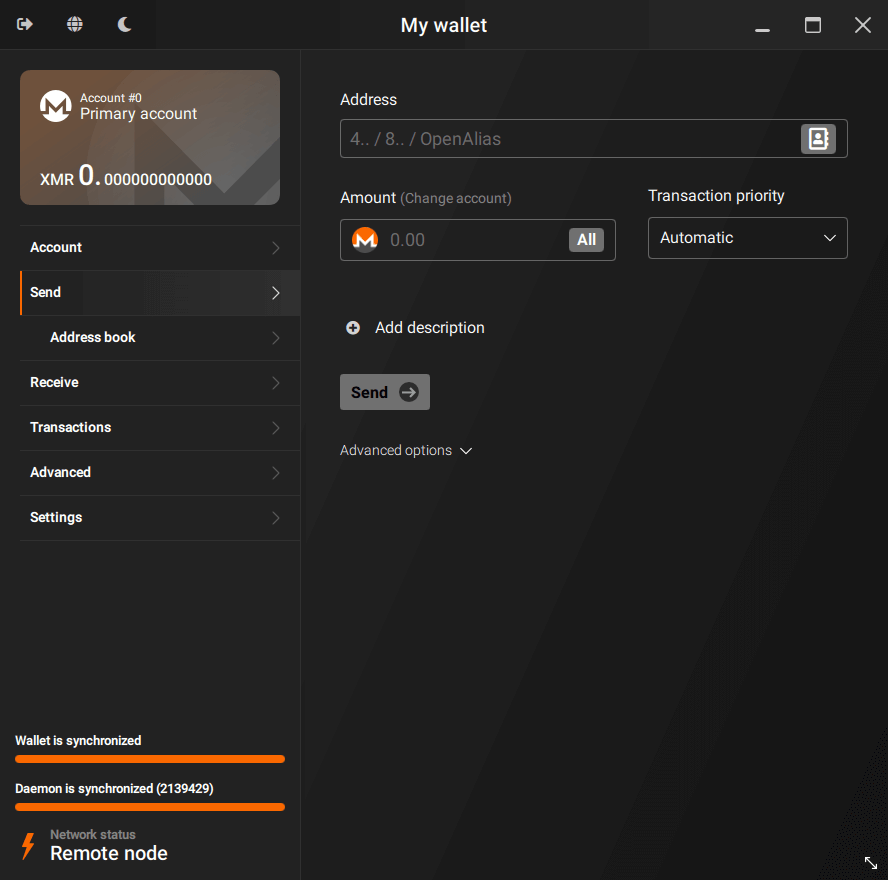
Certain cryptocurrencies recommend certain wallets; Monero recommends their first-party GUI wallet on desktop, for the best privacy.
For something on the lighter side, Stack Wallet likely has what you need. It’s open source, and has apps for mobile and desktop.
You’ll also see the distinction of a “hot” and “cold” wallet;
- Hot wallet: A wallet that touches the internet. These are considered less secure, as the internet potentially allows for a vector of attack. For example, a user can accidentally download malware, and that malware can steal that user’s crypto.
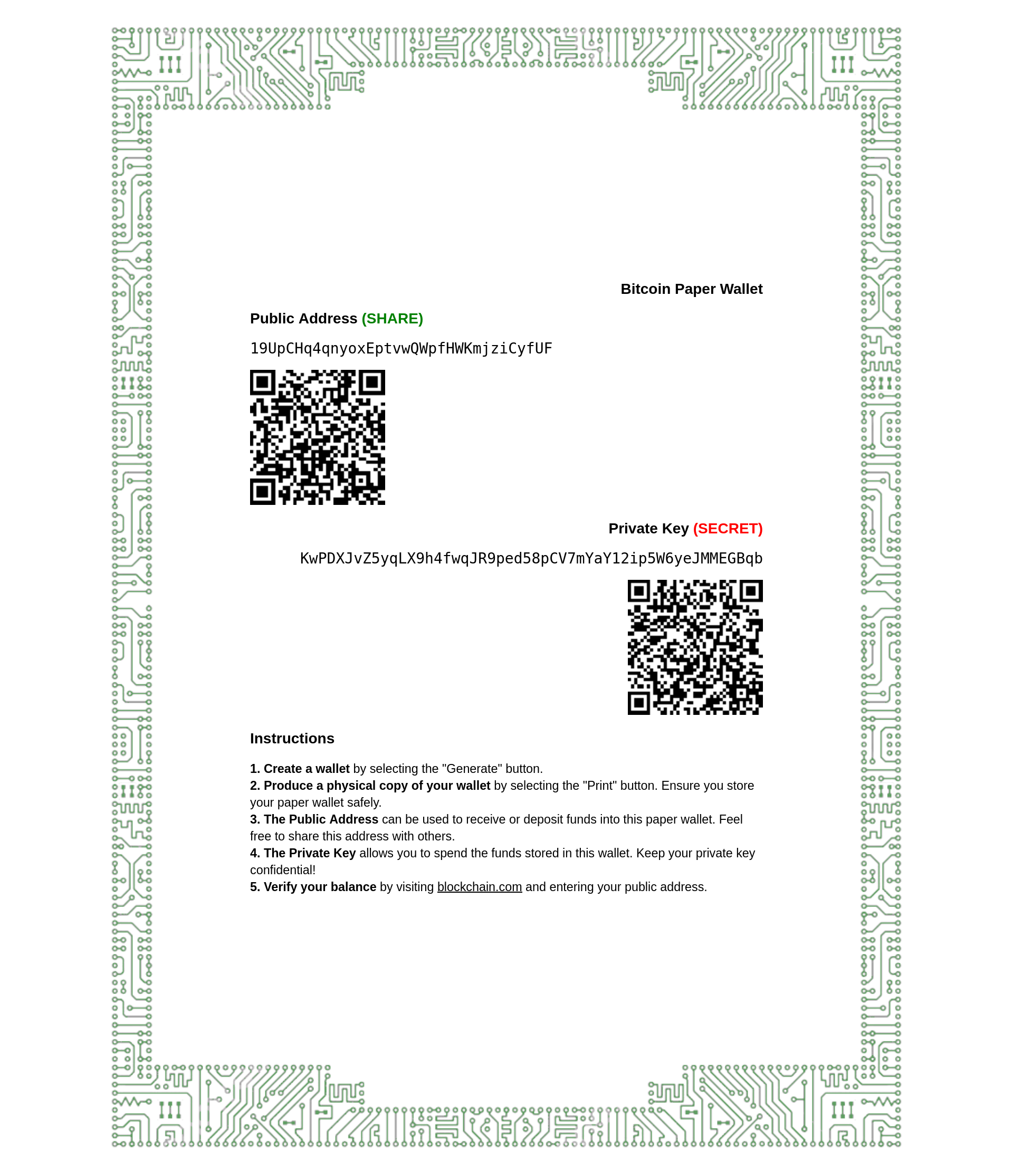
- Cold wallet: A wallet that remains offline. These are more secure than hot wallets. As long as the machine generating it isn’t compromised (or if so, is unable to communicate to the outside world), a hacker would need physical access to your literal paper keys, to steal your crypto.
Bitcoin Addresses
Section titled Bitcoin%20AddressesFor Bitcoin, there are four types of addresses. The table below is ordered by most modern to least.
| Address Type | Prefix | Example |
|---|---|---|
| Taproot (P2TR) | bc1p | bc1pu7awcm4s6cw5ccseguqs47u43henuhy9j4u6x3pjrczcpvmjv2hq3el7ch |
| SegWit (P2WPKH) | bc1q | bc1q868xd6vvwnzn5qjt2vghqwtth0as30ygv0kd4p |
| Script (P2SH) | 3 | 335qZjGEBLiEtLzUSxA591nNkKQW5mNV41 |
| Legacy (P2PKH) | 1 | 16hmVAATr6tYDzjwN2YBEWsY4xvhhrbyJ7 |
Ideally, you want to send to the more modern addresses, as transactions are cheaper and more secure. However, compatibility may not be there, and you may be provided an older type of address instead.
Bitcoin Private Keys
Section titled Bitcoin%20Private%20KeysAs the term “private key” suggests, these keys are meant to be private, and not shared. If leaked, your crypto may get stolen. Bitcoin private keys can come in many different formats. These include:
Seed phrase (truncated)
wage crumble remember ... million citizen squeezeBIP32 (truncated)
xprv9s21ZrQH143K2Eg7D5…7nU5pC6JfvBpJjqvMhBech32
L4k3yBmSAMoP5pMkD1oMAFkW35cTDJeTWdaLmFyjronMAWaq6DFPKx69eMLibDth1HjAV2uJFtMUeMSiJGKVjBi1fobt2vD6p1MWBbBCSegWit
L5W6WLviCd619UqV8fyk8KkK9i9zWwgt3mr5Zbrm25hrknjnsPpVKx69eMLibDth1HjAV2uJFtMUeMSiJGKVjBi1fobt2vD6p1MWBbBC
Ideally, your private keys is derived from a seed phrase. Bitcoin also supports BIP38, which allows you to set a passphrase for extra security.
Transfer Fees
Section titled Transfer%20FeesBlockchains have a transaction fee, to prioritize who gets to get recorded on a block.
This is needed to make sure the size of the blockchain doesn’t exceed how much a node has storage space.
On most chains, you can prioritize your transactions on how long it’ll take, by spending more on transaction fees. If it’s too low however, your transaction may not go through.
Mining
Section titled MiningIf you don’t wish to buy crypto, but still wish to obtain some, you can mine it.
You can mine to a pool like Zpool using spare computers. This includes laptops, desktops, or even smartphones with certain coins.
Zpool lets you exchange easily-minable coins, and then auto-exchanges them into other cryptocurrencies. You can have them given to you in the form of said easily-minable coins, or ones that are harder to mine (ex. Litecoin).
The cost of mining is usually:
- The electricity to run these intensive cryptographic calculations.
- Initial cost of purchasing the hardware.
- Degradation of hardware over time.
Hardware
Section titled HardwareThere’s different types of hardware used to mine cryptocurrency. The common ones are central processing unit (CPU), graphics processing unit (GPU), application-specific integrated circuit (ASIC), and field-programmable gate array (FPGA).
The latter half are specialized hardware specifically made for crypto mining. For most people though, you’ll be mining via your existing consumer hardware, which will be on your CPU and/or GPU.
Hardware can degrade over time when used. Degradation of hardware has a few caveats:
Central Processing Unit (CPU)
Also known as simply your processor, rarely permanently degrades if ever.
For maintenance, this usually is monitoring CPU temperatures, monitoring thermal throttling, and potentially replacing thermal paste if needed.
Graphics Processing Unit (GPU)
Also known as your graphics card. If you’re mining on your GPU, it can more likely degrade and stop working, if not maintained correctly.
General gist of maintaining them revolves around undervolting, monitoring temperatures to make sure (especially VRAM) chips don’t overheat, and cleaning up dust or degraded thermal paste.
Battery
If you’re mining with a device with a battery, having it plugged-in all the time can degrade it quicker. To mitigate this, if possible, see if your device has a way to limit the battery charge percentage.
You should also monitor the device to see if the battery will become a spicy pillow (aka. a swollen battery). See What to do with a swollen battery - iFixit if this happens.
Most merchants only take Bitcoin. However, if the merchant supports faster chains such as Bitcoin Cash, Litecoin, or Monero (which is one of the only chains that isn’t transparent!), transfers will be quicker and cheaper.
Zpool does support a variety of coins, including Bitcoin. However, be wary that the payout schedule for Bitcoin is significantly longer than a chain like Litecoin. If you’re mining there, use a Litecoin address, with the password C=LTC in your miner.
Certain wallet software also allow you to swap your cryptocurrency with another one, although note that you will still be beholden to transactions fees.
Software
Section titled SoftwareCrypto mining software does complex calculations on your hardware, as a way to have set rules on the blockchain, that can’t be overridden easily by a bad actor. You’re rewarded for contributing “hashrate”, the number of calculations per second your hardware can do.
Mining software are commonly flagged as malicious by malware detectors, as malware developers bundle this kind of software (along with stealing cookies, credentials, etc.), to profit off your infected machine.
Mining software itself could also be malicious, so I recommend isolating miners from your personal files. This could be, from best to worst, separate mining machines, VMs with GPU passthrough, or containers.
You may wish to forgo those security practices at your own risk, or use open-source mining software.
Be warned; some closed-source miners exist on platforms such as GitHub, that commonly have open-source miners. Closed-source miners such as GMiner, lolminer, and SRBMiner-Multi are on GitHub, but are not open source.
There are also many, many fake websites for crypto miners. If you come across a website for downloading a miner, make sure that website is linked to a GitHub account, with a GitHub repository.
Likely-Safe Miners
Section titled Likely-Safe%20MinersAlthough I believe these to be malware-free, install at your own risk.
The following miners are open source and minable on Zergpool:
| Miner | Crypto | Hardware | Operating System |
|---|---|---|---|
| XMRig (MoneroOcean fork) | Monero, Raptoreum, Kawpow, … | CPU, GPU | Windows, Linux (x86_64, AArch64) |
| XMR-STAK | Ryo | GPU | Windows, Linux (x86_64) |
| XMRig | Monero, Raptoreum, Kawpow, … | CPU, GPU | Windows, Linux (x86_64, AArch64) |
| JayDDee/cpuminer-opt | Yenten, … | CPU | Windows, Linux (no binary) |
| evrprogpowminer | Evrmore | GPU (6 GB+ VRAM required) | Windows (x86_64), Linux (no binary) |
| monkins1010/ccminer | Verus | CPU | Windows (x86_64) |
| Oink70/ccminer-verus | Verus | CPU | Linux (x86_64, AArch64) |
Check your hashrates, then how much money you’ll make over time with said hashrates, and see which one is most profitable for you. You can use sites like minerstat.com to calculate this for you.
Note that the GPU miners may not be the most profitable for you, verses a closed-source miner.
Conclusion
Section titled ConclusionI hope this article helped you get up-to-speed on the technicals of cryptocurrency.
If you’d like to learn more, I recommend the following:
- He Built a Privacy Tool. Now He’s Going to Prison. - Naomi Brockwell TV - A fantastic interview with a Bitcoin wallet developer named Keonne Rodriguez. They talk about why Bitcoin exists as an alternative payment platform, how to be private on the blockchain, and a first-hand account of violence against people who help protect your privacy.
- Line Goes Up - The Problem With NFTs: Documentary by Dan Olsen on YouTube.
- Web3 is Going Just Great: Created by Molly White, detailing the many, many disasters the crypto space has experienced.
- Coffeezilla: A highly-respected investigative journalist in the crypto space on YouTube.